Readings
Base path for all endpoints below:
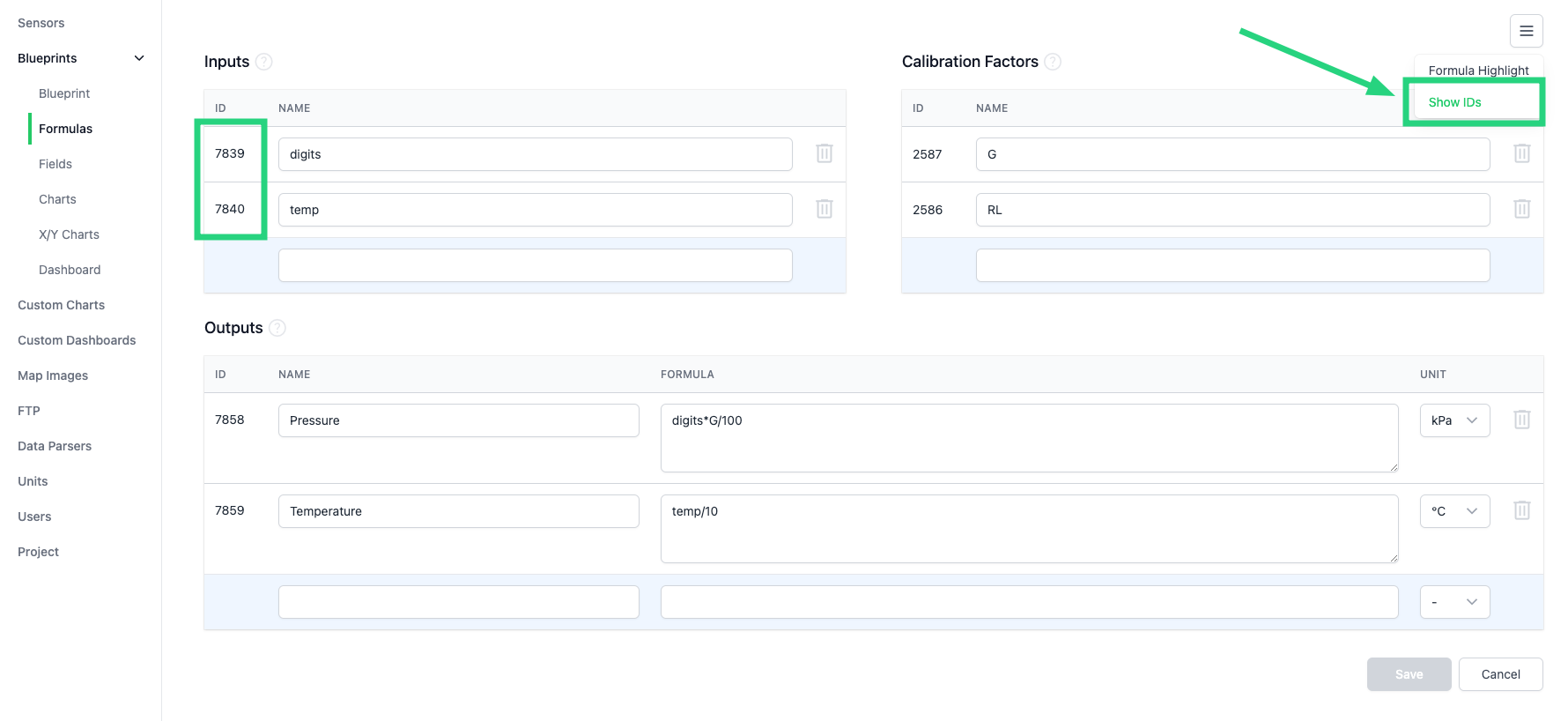
Readings belong to a single sensor. Only inputs are stored; outputs are calculated on the fly when viewing data in Sensly. Input IDs differ per blueprint instance — see Input IDs.
Endpoints
| Method | Path | Description |
|---|---|---|
GET |
/readings/{sensor_id} |
List readings for a sensor |
POST |
/readings/{sensor_id} |
Create readings for a sensor |
POST |
/readings/{sensor_id}/alarms |
Check readings against the sensor’s alarms |
URL parameters
| Key | Type | Description |
|---|---|---|
org_id |
number |
Organization ID |
proj_id |
number |
Project ID within the organization |
sensor_id |
number |
Sensor ID within the project |
List readings
GET /api/v1/org/{org_id}/proj/{proj_id}/readings/{sensor_id}
Query parameters
| Key | Type | Example | Description |
|---|---|---|---|
datetime__gte |
string |
2023-10-07T07:00:13Z |
Greater than or equal to the specified datetime |
datetime__gt |
string |
2023-10-07T07:00:13Z |
Greater than the specified datetime |
datetime__lte |
string |
2023-11-07T07:00:13Z |
Less than or equal to the specified datetime |
datetime__lt |
string |
2023-11-07T07:00:13Z |
Less than the specified datetime |
outputs |
boolean |
true |
Include calculated outputs. Default: false |
limit |
number |
1000 |
Maximum readings to return. Default and maximum: 1000 |
Example request
Example response
[
    {
        "id": "a2bd1159c29ca76977c7197e02683db5",
        "datetime": "2023-11-01T05:02:40.653Z",
        "inputs": {
            "7849": 107.83,
            "7850": 203.53
        },
        "outputs": {
            "8833": 333.83,
            "8834": 444.53
        }
    },
    {
        "id": "cb18189b7cde24f3b32e91406a8c0e0f",
        "datetime": "2023-11-01T06:02:40.659Z",
        "inputs": {
            "7849": 107.84,
            "7850": 203.18
        },
        "outputs": {
            "8833": 333.84,
            "8834": 444.18
        }
    }
]
Create readings
POST /api/v1/org/{org_id}/proj/{proj_id}/readings/{sensor_id}
Provide an array of readings. Each reading only needs datetime and inputs — the sensor is taken from {sensor_id} in the URL, so every reading in the body must belong to that sensor. To create readings for multiple sensors, call this endpoint once per sensor.
Readings with the same datetime are overwritten.
Example request
[
    {
        "datetime": "2023-11-01T05:02:40.653629Z",
        "inputs": {
            "7849": 107.83,
            "7850": 203.53
        }
    },
    {
        "datetime": "2023-11-01T06:02:40.653629Z",
        "inputs": {
            "7849": 107.84,
            "7850": 203.18
        }
    }
]
Example response
Check alarms
POST /api/v1/org/{org_id}/proj/{proj_id}/readings/{sensor_id}/alarms
Evaluates the provided readings against the sensor’s configured alarms. The request body uses the same structure as create readings. Readings are not stored — they are only checked for alarms.
To check only the most recent reading, supply a single item in the array.
Example request
Example response
Input IDs
Input IDs are shown on the Blueprint > Formulas setup page. Note that IDs will differ between blueprints as each blueprint is created as a unique instance.